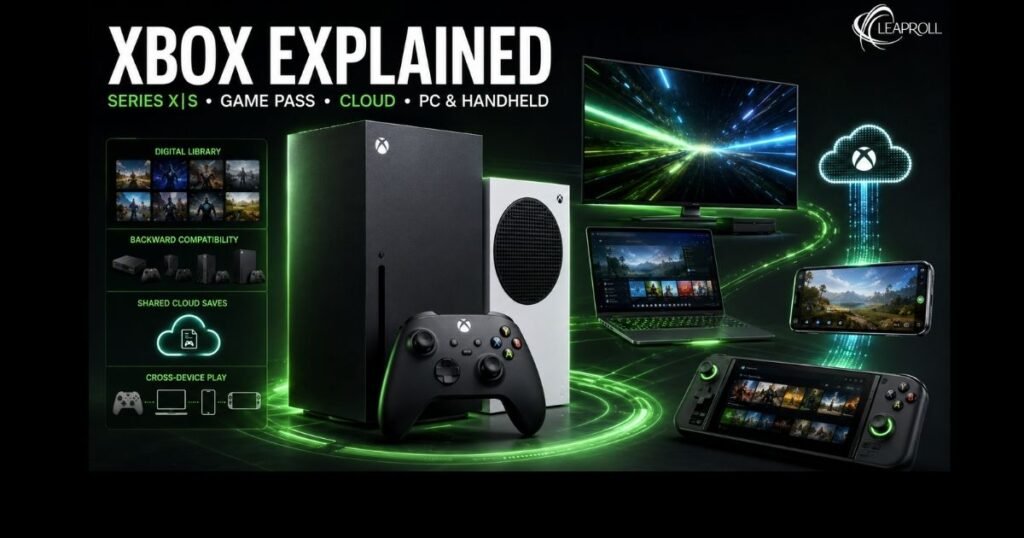
Xbox began as Microsoft’s game console, but the name now covers much more: console hardware, PC gaming, subscriptions, cloud streaming, online services, accessories, first-party studios, and an account system that can carry supported games and progress across devices. In other words, Xbox is both a console brand and a connected gaming ecosystem.
For most buyers, the immediate choice is still between Xbox Series X and Xbox Series S. Series X prioritizes native 4K performance and offers configurations with a disc drive; Series S is smaller, less powerful, and entirely digital. Yet the better purchase depends on more than raw specifications. Your TV, existing disc collection, storage needs, internet connection, and interest in Game Pass can matter just as much.
What is Xbox?
Xbox is Microsoft’s gaming brand and platform. It includes Xbox consoles, the Xbox network, digital game stores, Game Pass subscriptions, Windows gaming apps, cloud streaming, controllers, accessibility hardware, and games published by Microsoft-owned studios.
Microsoft launched the original Xbox on November 15, 2001. The main home-console generations that followed were Xbox 360 in 2005, Xbox One in 2013, and Xbox Series X|S in 2020. Microsoft’s own corporate timeline confirms the 2001 and 2005 launches, while its 2015 annual report records the Xbox One’s November 2013 release. The official Series X page confirms that the current generation launched on November 10, 2020.
The meaning of the brand has expanded with every generation. Xbox today is less about forcing players onto one device and more about giving an account access to games across supported hardware. That can include a living-room console, a Windows PC, a gaming handheld, a phone or tablet using cloud streaming, and selected smart TVs or streaming devices.
That does not mean every Xbox game works everywhere. Compatibility, ownership rights, saves, input methods, subscription requirements, and regional availability still vary. “Xbox ecosystem” describes the connection between devices; it is not a promise of universal access.
Key takeaways
- Xbox is an ecosystem, not only a box under the TV. It spans Series X|S consoles, Windows PCs, supported handhelds, cloud gaming, mobile apps, TVs, games, accounts, and services.
- Xbox Series X is the performance choice. It targets true 4K gaming, supports up to 120 frames per second in compatible games, and is available in disc-drive and all-digital configurations.
- Xbox Series S is the lower-cost digital choice. It offers 512 GB and 1 TB versions, has no disc drive, and is best suited to players comfortable downloading or streaming games.
- Game Pass is optional, not required. You can still buy Xbox games individually. The right subscription depends on device, catalog, day-one access, cloud gaming, and multiplayer needs.
- Your library can extend beyond one device. Supported Xbox Play Anywhere games share ownership, saves, add-ons, and achievements across Xbox consoles, Windows PCs, and compatible handhelds.
- Check regional details before buying. Console models, prices, Game Pass plans, cloud support, and game availability differ by country.
The four Xbox console generations
| Generation | Launch era | Why it mattered |
| Original Xbox | 2001 | Microsoft entered console gaming and established franchises such as Halo. |
| Xbox 360 | 2005 | Online play, achievements, digital distribution, and media features became central to the experience. |
| Xbox One | 2013 | Xbox expanded digital libraries, entertainment functions, backward compatibility, and cross-device services. |
| Xbox Series X/S | 2020 | ast SSD storage, Quick Resume, higher frame rates, modern backward compatibility, and two distinct price/performance tiers defined the generation. |
This history matters to current buyers because backward compatibility remains a meaningful Xbox strength. Microsoft says Series X can improve load times, resolution, frame-rate stability, and input latency on thousands of compatible Xbox One, Xbox 360, and original Xbox games. Compatibility is title-specific, however, and older licensed games or games requiring discontinued accessories may not be supported.
Xbox Series X and Series S explained
Xbox Series X and Series S play the same current-generation Xbox releases, but they are designed for different budgets and displays. Microsoft positions Series X as its fastest and most powerful Xbox, while Series S is the value-focused, all-digital option on the official Xbox console page.
Xbox Series X: for 4K performance and physical media
Xbox Series X uses a custom eight-core Zen 2 processor, a 12-teraflop RDNA 2-class graphics processor, and 16 GB of GDDR6 memory. Microsoft lists true 4K gaming, up to 120 FPS in supported titles, a custom NVMe SSD, and hardware-accelerated ray tracing among its capabilities.
The standard 1 TB Carbon Black Series X includes a 4K UHD Blu-ray drive. An all-digital 1 TB version also exists, so buyers should not assume that every tower-shaped Series X accepts discs. Microsoft’s June 2026 price announcement said its 2 TB model was being sunset, making local stock and configuration checks especially important.
Series X is generally the better fit if you:
- Use a 4K television and care about image quality or steadier performance
- Own compatible Xbox game discs or Blu-ray movies
- Prefer buying used, discounted, or collectible physical games
- Want more graphics headroom for demanding releases
- Expect to keep the console for several years
Xbox Series S: for affordable, all-digital gaming
Xbox Series S uses the same broad CPU architecture but a less powerful 4-teraflop GPU and 10 GB of GDDR6 memory. Microsoft offers 512 GB and 1 TB all-digital configurations. The console supports up to 120 FPS in compatible games, but it is designed around lower rendering resolutions than Series X; Microsoft describes it as a 1440p-focused machine with the ability to upscale to 4K.
Series S has no optical drive. A physical Xbox disc cannot be inserted, and the console does not become a disc console by attaching a generic external drive. That makes the smaller upfront cost only one part of the buying decision: digital store prices, subscription costs, and storage expansion can affect long-term value.
Series S is generally the better fit if you:
- Want the lowest-cost entry into current Xbox console gaming
- Play on a 1080p or 1440p display
- Are comfortable buying games digitally
- Plan to use Game Pass heavily
- Need a compact second console
- Do not own a valuable physical Xbox library
Xbox Series X vs Series S: the differences that matter
| Feature | Xbox Series X | Xbox Series S |
|---|---|---|
| Best for | Higher visual quality, 4K TVs, physical libraries | Lower upfront cost, digital-first play, smaller spaces |
| Graphics | 12-TFLOPS custom RDNA 2 GPU | 4-TFLOPS custom RDNA 2 GPU |
| Memory | 16 GB GDDR6 | 10 GB GDDR6 |
| Typical resolution focus | True 4K | 1440p with 4K upscaling |
| Frame-rate ceiling | Up to 120 FPS in supported games | Up to 120 FPS in supported games |
| Optical drive | Available on the standard disc model; an all-digital Series X also exists | No disc drive |
| Internal storage options | Model-dependent; 1 TB is the principal listed configuration after the announced 2 TB sunset | 512 GB or 1 TB |
| Physical size | Larger | Much smaller |
Performance figures are ceilings, not guarantees. Resolution and frame rate depend on the game, its selected mode, developer optimization, display capability, and HDMI configuration.
The most practical question is often not “Which console is more powerful?” but “Will the limitations of Series S cost me more later?” A buyer who fills a 512 GB drive, purchases an expansion card, and later wants physical games may have been better served by Series X. Conversely, a player using a 1080p monitor and a digital library may pay for Series X performance they rarely notice.
What is Xbox Game Pass?
Xbox Game Pass is Microsoft’s gaming subscription service. Depending on the plan and region, it can provide a rotating library of console and PC games, online console multiplayer, cloud gaming, partner catalogs, in-game benefits, discounts, and access to selected new releases.
As of verification, the official Game Pass page listed Essential, Premium, Ultimate, and PC plans. Microsoft described Ultimate as offering 400-plus games across console, PC, and other supported devices with selected new games on day one. Premium included a smaller library and Xbox-published games within one year of launch, while Essential focused on a more compact library, cloud gaming, benefits, and online console multiplayer. PC Game Pass was dedicated to Windows PC.
Those numbers and benefits are not permanent promises. Microsoft explicitly notes that titles, features, availability, and plan benefits vary over time, platform, region, and subscription tier.
Is Xbox Game Pass worth it?
Game Pass can be valuable when you play several different games each year, enjoy trying titles you might not buy, use multiple supported devices, or want cloud access. It can be poor value when you repeatedly play one free-to-play game, buy only one or two releases per year, or prefer permanent ownership.
Before subscribing, check four things:
- The current catalog in your region. A headline library size says little if the games you want are absent.
- The exact plan benefits. Day-one releases, partner libraries, cloud priority, and PC access are not identical across tiers.
- Recurring billing. Xbox says subscriptions continue automatically unless canceled.
- What happens when a game leaves. Access ends unless you buy the game, although subscriber discounts may apply to eligible titles.
Xbox Cloud Gaming, Remote Play and Play Anywhere are different
These three features are frequently confused, but they solve different problems.
Xbox Cloud Gaming
Cloud Gaming runs a supported game on Microsoft’s servers and streams the video to your device. You do not need to install the full game locally, but you need a supported country, device, browser or app, compatible controls, and a stable internet connection. Xbox recommends at least 10 Mbps download speed, with some devices needing 20 Mbps for the best quality, according to its Cloud Gaming requirements.
Streaming is convenient, but image quality, responsiveness, queues, and reliability depend on network conditions and plan. Competitive players and people with data caps should treat cloud gaming as an option, not an automatic replacement for local play.
Xbox Remote Play
Remote Play streams games from your own Xbox console to another supported device over the internet. The console is the host, and the game must be installed there. It is useful when the main television is occupied or when you want access to your console library away from the console, but network quality at both ends affects the experience.
Xbox Play Anywhere
Play Anywhere is a digital ownership feature for participating games. Buy a supported digital title once and play it on Xbox console, Windows PC, and supported Windows gaming handhelds at no additional charge. Microsoft says saves, add-ons, and achievements travel with the same Xbox account. Only games displaying the Play Anywhere badge qualify, so check the store listing before buying.
Xbox games, studios and backward compatibility
The Xbox library includes Microsoft-owned franchises and third-party releases. Microsoft Gaming’s portfolio spans Xbox Game Studios, Bethesda-related studios, and Activision Blizzard, while independent developers publish through programs such as ID@Xbox. Major Xbox-associated properties include Halo, Forza, Gears of War, Minecraft, Age of Empires, Fallout, The Elder Scrolls, Doom, Call of Duty, Diablo, and World of Warcraft, although platforms and availability differ by title.
Not every Microsoft-owned game is exclusive to Xbox consoles. Microsoft publishes selected games on competing platforms and Windows, while its June 2026 showcase also identified Gears of War: E-Day and Clockwork Revolution as Xbox console exclusives. Buyers should check each game’s official platform listing rather than assume that “Xbox-owned” means “Xbox-console-only.”
Smart Delivery simplifies compatible cross-generation purchases by installing the best available version for the console being used. Backward compatibility lets selected older titles run on newer hardware. These features overlap, but they are not the same: Smart Delivery concerns the correct version of a supported purchase, while backward compatibility concerns running a game from an earlier console generation.
Controllers, storage and accessibility
The current Xbox Wireless Controller adds a dedicated Share button, textured triggers and bumpers, and a hybrid directional pad. It works across Xbox consoles and selected PCs and mobile devices. Many Xbox One controllers and headsets also work with Series X|S, reducing the cost of moving from the previous generation.
Storage requires more planning. Current-generation games are large, and the usable space is lower than the advertised drive capacity after system files and formatting. USB storage can hold many games and run compatible older titles, but games optimized for Series X|S generally need the internal SSD or an approved storage expansion card to play with full current-generation performance.
Xbox also offers accessibility features and specialized hardware, including the Xbox Adaptive Controller. Buyers with specific mobility, vision, hearing, or input needs should consult Xbox Accessibility and individual game accessibility pages before purchasing; support differs by game and accessory.
What changed for Xbox in 2026?
Xbox turned 25
Xbox marks 25 years on November 15, 2026. Microsoft’s celebration includes community themes, curated Game Pass collections, merchandise, FanFest events, and anniversary hardware. In August, Microsoft opened select-market pre-orders for an individually numbered Xbox Series X25 Limited Edition and an X25 Special Edition Wireless Controller.
The limited-edition console was announced for a November 13, 2026 launch at $899.99 in the United States, with regional pricing and availability varying. For specifications, ordering conditions, and availability, Leaproll readers can see the site’s guide to the Xbox 25th Anniversary Collection pre-order.
Console prices increased
Microsoft announced worldwide price increases effective August 1, 2026: $100 for 512 GB models and $150 for 1 TB models in the United States, alongside the planned sunset of its 2 TB model. Regional prices and financing programs vary, so readers outside the United States should verify local retailers rather than convert the U.S. figures directly.
This makes total-cost comparisons more important. A console’s sticker price should be evaluated together with storage, subscription fees, controllers, physical versus digital game prices, and expected years of use.
Disc-to-digital testing began
On August 26, Microsoft announced an Xbox Insider test that lets owners of supported Xbox One and Xbox Series X discs claim a digital entitlement by inserting the disc and launching the game. Testing began August 31. Microsoft said most Xbox One and Series X disc-based games support the feature and that thousands of titles were included initially, but not every title was available.
This is promising for convenience and preservation, but it is a test—not a universal guarantee. Eligibility is game-specific, and the broader rollout may evolve after Insider feedback.
Xbox expanded further into handheld gaming
The ROG Xbox Ally and Ally X are Windows 11 handhelds made by ASUS with an Xbox-optimized interface. They can aggregate supported games from Xbox and other PC storefronts, while Play Anywhere titles can carry progress across supported Xbox devices. They are not miniature Series X consoles; they are Windows gaming PCs in a handheld form factor, with the setup flexibility and compatibility considerations that implies.
Which Xbox setup should you choose?
Choose Xbox Series X if…
You want the strongest console performance, use a 4K display, own physical games, watch UHD Blu-rays, or want the least compromised long-term console experience.
Choose Xbox Series S if…
You want a compact, lower-cost console, are comfortable with a fully digital library, play on a 1080p or 1440p screen, and do not mind managing limited storage.
Choose PC Game Pass or a Windows handheld if…
You already prefer Windows gaming, need keyboard-and-mouse support, want access to multiple PC stores, or value portable play more than a fixed living-room console.
Try cloud gaming first if…
You want occasional access on an existing device and have a fast, stable connection. Test latency and image quality before treating it as your primary gaming platform.
Skip a subscription if…
You play only a few games for a long time and would rather own them. Xbox hardware does not require Game Pass for ordinary offline play, although online console multiplayer requirements vary and free-to-play games are treated differently.
Final Words
Xbox in 2026 is best understood as a network of choices. Series X offers the strongest dedicated console experience; Series S lowers the cost of entry; Game Pass makes discovery and multi-device access easier; Play Anywhere connects selected digital purchases; and cloud and handheld options make the platform less dependent on one screen.
The right Xbox purchase is therefore not automatically the most powerful console or the largest subscription. It is the combination that matches your display, library, internet connection, play habits, and budget with the fewest expensive compromises.
If this guide helped clarify the difference between Xbox hardware and the wider ecosystem, save it for your purchase comparison and share it with someone still deciding between Series X, Series S, PC, or cloud play. For the latest collector hardware, explore Leaproll’s Xbox 25th Anniversary Collection coverage.
Disclaimer: Information verified as of August 31, 2026. Hardware availability, prices, subscription benefits, game libraries, and cloud support vary by market and may change.
FAQs about Xbox
Yes. Xbox is Microsoft’s gaming brand. It includes consoles, games, online services, subscriptions, cloud gaming, PC software, accessories, and Microsoft-owned game studios.
Xbox Series X and Xbox Series S are the current standard console family. Both launched on November 10, 2020. Special editions and storage configurations do not represent a separate console generation.
Series X has substantially more graphics power, targets true 4K gaming, includes more memory, and is available with a disc drive. Series S is smaller, less expensive, and all-digital, with 512 GB and 1 TB storage options.
No. Xbox Series S has no optical drive and cannot accept physical Xbox discs. Buyers need digital purchases, subscriptions, or supported cloud gaming.
Yes. You can buy compatible Xbox games individually in digital or physical form, depending on the console model. Game Pass is an optional subscription, although some online multiplayer functions may require an eligible plan.