

Each student enters a classroom with a different story (different strengths, different gaps, different comprehension of the world, etc.). However, over the decades education has been created predominantly at one speed and in one direction whereby all learners are expected to be at the same standard at the same time. The model is a fundamental challenge to Progress Learning. Having been interpreted both as a philosophy of adaptive, student-centred teaching and as the name of a potent cloud-based K-12 platform, progress learning can be viewed as a paradigm shift in delivering education, making individual development a central focus, rather than the strict, one-size-fits-all method.
Progress Learning is the platform based at progresslearning.com, is a standards-based, supplemental curriculum resource designed to serve learners at kindergarten through 12th grade. It integrates individualised practice, adaptive intervention, gamification, and real-time data reporting into one, conveniently-accessible system that is used by thousands of the schools in the United States. This paper will discuss the definition of progress learning, how the platform functions, its key attributes, the process of logging in and registering, its costs, and why it is revolutionising the performance of students with all levels of ability.
What is Progress Learning?

Progress learning is essentially a philosophy that puts the student development at the centre of the learning process. In conventional classes, teaching is usually in the middle – that is, instruction is designed to meet the needs of the mediocre student, simultaneously over-stimulating the gifted child and confusing the student who requires more attention.
The compromise is denied by progress learning. It promotes a comfortable and the right level of challenge in learning through adaptive methods, data analytics, and technology, which makes certain that every student learns at a pace that is comfortable and challenging.
Progress Learning platform realises this philosophy on a large scale. It offers teachers more than 300,000 practice items in 47 different formats such as multiple-choice, technology-enhanced items and interactive activities all automatically aligned to state and national standards. The platform sets a benchmark on the first day itself to every student with diagnostic tests, and converts that information into a unique roadmap of teaching.
Key Features of the Progress Learning Platform
Progress Learning will be targeting students, teachers and administrators. The essential characteristics of it are:
Standards-aligned content: All activities, quizzes, games and practice sheets are directly mapped to state standards and time on the platform directly translates to better performance on state assessment.
- Individualised study plans: Every student has a tailored learning plan depending on the level of performance that they are at, so that the relevant and at the same time challenging content is always available.
- Short feedback and correction: Answer on wrong questions will result in focused feedback – usually in the form of a brief explanatory video – to ensure that students correct their knowledge before proceeding.
- Quick Click Remediation: With a single click on the reporting dashboard, teachers can give more targeted practice to struggling students.
- Gamification and interaction: Students receive rewards, stars, badges and tokens as they master the skills. The Game Arcade in secondary schools provides the opportunity to unlock games with tokens without affecting academic rigour.
- Actionable data dashboards: Real-time reports indicate mastery levels, time-on-task and performance gaps. The dot-rank system disaggregates every domain standard, standard by standard which is precisely targeted.
- Platform integrations: Integrated with Google Classroom, Clever, ClassLink, and Canvas, with a well-established digital infrastructure, schools find it simple to adopt.
Liftoff: Struggling Learner Adaptive Intervention
- Liftoff is an adaptive intervention programme that targets students in grades 2-8 who are behind grade level in math, reading or science. Liftoff offers a structured, focused course back to grade-level mastery to Tier 2 and Tier 3 learners. It starts by determining the real level of learning of each student using embedded diagnostic tests, or purchased NWEA MAP test data that determines the exact location in the vertical skills hierarchy where the learning is failing.
- Liftoff, which is presented as a space-themed game in which students can create avatars, set off rockets, and navigate the galaxies, makes intervention feel more of an exploration than a remediation. The programme also accommodates bilingual learners in the English and Spanish language modes and text to speech features- it is a complete inclusion tool to ESL and dual language classrooms.
Grade Level Learning Progressions
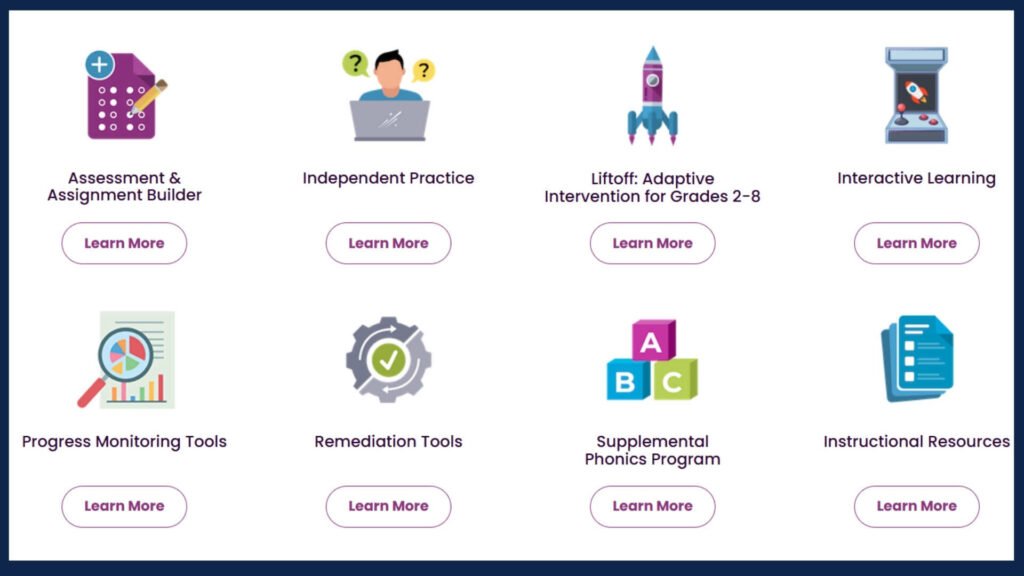
- The platform at the elementary level concentrates on developing some basic skills with the use of fun activities which also equip students with state testing. In the case of middle school students, it will include the Game Arcade and Liftoff adaptive intervention that will take into consideration motivational difficulties and offer stringent standards-based practice. Progress Learning also goes beyond the basic curriculum at high school and adds extensive College and Career Readiness information – including SAT, ACT, AP testing, ACT WorkKeys and ASVAB – to get students ready to leave high school.
Progress Learning Login and Registration Steps
Any user type (students, teachers, administrators) can easily access the Progress Learning platform. This is a complete web-based platform that does not need software. It can be accessed through any device that has Wi-Fi connections such as desktop computers, laptops, tablets, and smart phones.
Steps to Student and Teacher login
- Open any web browser and go to app.progresslearning.com.
- On the login screen, input your Account ID, Username and Password and click on Login.
- In case your school uses Clever, ClassLink or Canvas, then from the related SSO (Single Sign-On) button, log in via those portals without a new username and password.
- In case your school has Google Classroom, you will have a choice of Google login to make the direct authentication.
- Forgotten passwords can be reset via the Reset Password link on the login screen.
Registration – School and District Level
Paid yearly accounts and student self-registration are not provided to individual teachers or students at Progress Learning. The platform is only based on the school-wide and district-wide licences. This model guarantees complete support, training and product quality to all the campuses. Registration here is done in the following manner:
- Contact Progress Learning: Schools/districts call Progress Learning directly through progresslearning.com or call 877-377-9537 and talk about licensing.
- Demo or short term pilot can be organized in schools and districts that will review the platform and decide to have a full licence.
- When a licence is bought, the school or district administrator gets the logins and creates accounts of teachers and students on campus.
- Student accounts are normally provided automatically, with integrations with Clever, ClassLink, or Google Classroom – do not manually create student accounts on a case-by-case basis.
- Thanks to the free 7-day trial, district administrators can request the extension of the trial in other subject areas directly on the platform in the section School Center > Account Information.
- Those educators who had a free individual account and would like to talk about further access should address the team at [email protected]. No longer do individual teacher licences exist, however, administrators can recommend a school-wide licence via their principal, instructional coach or curriculum director.
Progress Learning Pricing and Fees Structure
Progress Learning is a campus-based bundling pricing model as opposed to charging each student. This methodology renders it much more affordable and scalable among schools of different size. Precise price is determined by the size of the campus, grade levels covered and the subjects covered. The pricing structure is as follows:
| Pricing Factor | Details |
| Pricing Model | Campus based bundling pricing -not per student. A single fee per campus in a school. |
| Price Determinants | The size of enrolment on campus, the grade levels served (elementary / middle / high school), the subjects covered. |
| District Discounts | District-wide discounts are offered to all the campuses in a district when the district subscribes as a single group. |
| Teacher Individual Licence | Not available. Licences are all school or district wide. |
| Free Trial / Demo | Yes – schools and districts can have demos and short-term pilots before they make a purchase. |
| 7-Day Subject Trial | Subject admins can enable a 7-day trial of other areas of the subject within the platform. |
| Payment Modes | Online orders at progresslearning.com/our-products/pricing/ or over the phone. Note: credit card payments are subject to a 3% surcharge. |
| Phone Orders | Call 877-377-9537 to make an order or inquire about prices. |
| Funding Sources | Title I funds, ESSER federal funding, state grant programmes and PTA/PTO sponsorships are some of the funds that many schools use to pay the Progress Learning licences. |
| Liftoff (Add-on) | Liftoff adaptive intervention can be purchased as an independent product, at the campus or district level, in grades 2-8. |
| Support Included | All school and district licences are provided with onboarding support, training materials and customer success management at no extra cost. |
Progress Learning does not release set public pricing as prices are tailored to the size and structure of the campus. It is the recommendation of the team that schools and districts contact the team directly to get a custom quote. More than 6,000 schools in the US use the platform, and the bundled pricing approach has continuously made it more affordable than its competitors who charge per student.
Teacher, Administrator and School Benefits
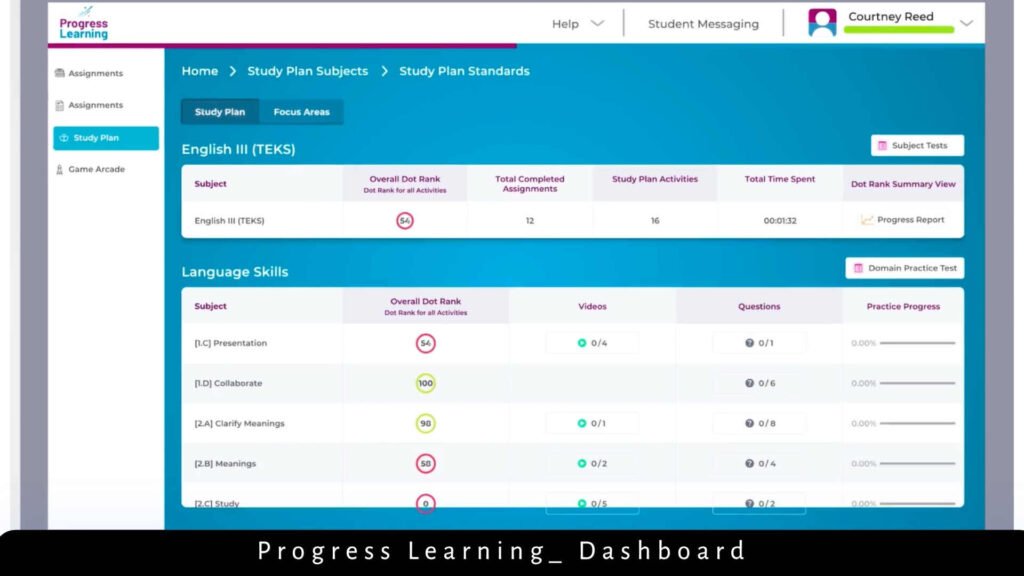
Progress Learning is often mentioned by teachers as a time-saving resource that enables them to use less time on preparing materials and more time on delivering specific instruction. Automated marking, immediate reporting, and ready to use standards based content save the administrative burden to a great extent. To administrators, district and school dashboards give them a birds-eye view of performance by grade level, allowing them to make strategic decisions related to resource allocation and intervention support.
A study at Johns Hopkins University conducted on the Douglas County School System in Georgia confirmed that when Progress Learning was implemented fidelity-based, it yielded significant results in both the math and reading scores on the Georgia Milestones state assessment, which in turn provided independent evidence of the academic impact of the platform.
Conclusion
Progress Learning is not just an online tool, it is a concrete demonstration of the idea that all students need to be taught through their personal needs in mind. Through the integration of adaptive technology, alignment to standards, gamification, practical data access, easy access to a login, and a scalable, campus-based pricing model, the platform provides educators with all the tools they need to make the learning process a genuine personalisation without hours of other preparation.
Progress Learning addresses a student whether he or she has been studying grade-level standards at the first level, has lost his or her basic skills with Liftoff, or is about to take the SAT and ACT exams, right where he or she is. To schools and districts who are committed to bridging learning gaps, and raising achievement among all students, it is a platform that provides, and a licence model that enables it to be done at a cost that is financially affordable.
FAQs
Progress Learning is a K-12 supplemental curriculum platform based on cloud computing which offers customised practice, customised intervention, gamified activities and real-time reporting of data to state and national standards.
Students access the application (app.progresslearning.com) with their Account ID, Username, and Password. Schools with Clever, ClassLink, Canvas, or Google Classroom would be able to log in through those applications using Single Sign-On (SSO).
No. Progress Learning does not have individual teacher accounts or free accounts anymore. All licences are bought at the school or district level. Through their principal or administrator teachers are able to lobby a school-wide licence.
Also, Read About –
Resultrize com: Categories, Features, Benefits & Login Guide