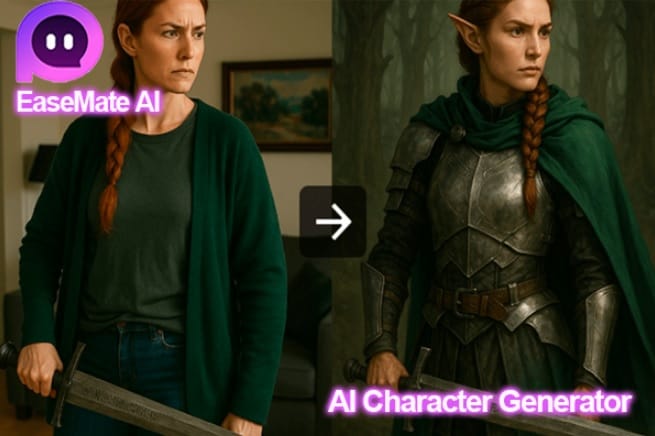
AI character generators like EaseMate AI have revolutionized digital creation, enabling artists, writers, developers, and everyone to craft lifelike personas in minutes. Powered by advanced AI models, they can quickly generate characters from reference images or text descriptions. This ultimate guide will walk you through the definition, benefits, usage guide, top choices, and safety considerations of AI character makers.
What Is an AI Character Generator
An AI character generator is an AI-driven tool that creates visual or conceptual personas using advanced machine learning models. It interprets user inputs—such as detailed text descriptions (e.g., “a vintage-style baker with curly brown hair and a checkered apron”) or reference images, and then transforms them into polished, customizable characters.
Designed for artists, game developers, marketers, writers, and casual creators alike, it eliminates the need for professional design skills, cutting creation time from hours to minutes. Tools like EaseMate AI enhance this experience by blending simplicity with functionality, making high-quality character generation accessible to all skill levels.
- Versatile Input Options: It supports multiple input types, including text prompts (covering appearance, personality, or setting) and reference images—adapting to how users prefer to brainstorm or refine ideas.
- Deep Customization: Users can adjust styles (e.g., anime, realism, 3D), tweak details (hairstyle, clothing, expressions), and align characters with specific use cases (game avatars, brand mascots, story protagonists).
- Time & Skill Efficiency: It automates tedious design work, generating initial drafts in minutes. No advanced drawing or 3D modeling skills are needed, making it ideal for tight deadlines.
- Cross-Use Case Adaptability: It serves diverse fields—artists use it for concept art, game devs for in-game characters, and casual users for social media avatars or fan art.
Pick the Best Free AI Character Generator in 2025
Free character generators are becoming more popular in digital creation, especially for artists, game developers, and writers. Among them, EaseMate AI stands out as a top choice. It integrates robust character generation with versatile creative features, making it ideal for both quick concepts and refined designs.
Powered by models like GPT-4o Mini and DeepSeek V3, EaseMate AI character generator is available as a web app and Chrome extension, requiring no login for most features. It can instantly turn any text or image into your dream character. Moreover, it links to tools like AI image generator, letting users expand characters into dynamic content, perfect for stories, avatars, or marketing assets.
Here’s why it’s worth:
- No-cost access: Most character generation features are free, with no mandatory registration. Daily limits (e.g., 6 free character images) satisfy casual and early-stage needs.
- High-quality output via multi-model support: Integrates top-tier AI models to ensure consistent, detailed characters—adapting to styles like anime, realism, or comics.
- Multi-input flexibility: Generates characters from text prompts (e.g., “a steampunk engineer with goggles”) or reference images, with room to tweak details.
- Cross-function synergy: Directly export characters to its AI animator or video generator for end-to-end creation, skipping tool-switching.
- Privacy & accessibility: Doesn’t store user data and supports 17 languages, safe for global creators.
How to Use AI to Generate Your Own Characters
Starting with AI character generators is super easy! This beginner’s guide will walk you through the step-by-step process on how to generate an amazing character via EaseMate AI. Let’s break it down.
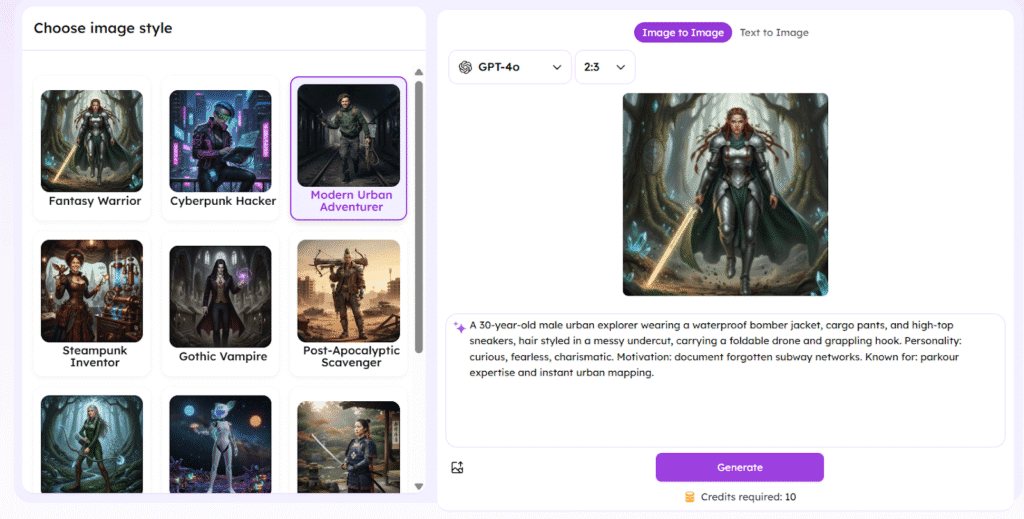
Step 1. Select a preferred image style from the left side. Alternatively, navigate to the “Text to Image” section and describe the character you’d like to create in detail.
Tip: You can also toggle on “reference image” to create an AI character from a reference image.
Step 2. Specify all the settings like aspect ratio, AI models, and output format based on your needs. Then, click “Generate” to start the AI character generation.
Ste 3. Once created, you can preview the AI-generated character image. Export it without a watermark for further usage or immediate sharing.
Is the AI Character Generator Safe to Use
While generally safe for casual use, AI character generators come with risks. The primary concern is data privacy, as the prompts and images you upload may be used to train AI models, potentially exposing sensitive or copyrighted ideas.
Furthermore, the AI can sometimes generate inappropriate, biased, or offensive content based on its training data. There’s also a risk of plagiarism, where the output might closely resemble existing copyrighted characters, leading to legal issues if used commercially.
To use these tools safely, follow these guidelines:
- Review Terms of Service: Always check the platform’s privacy policy and terms. Look for how they handle your data, whether they store your inputs, and if they claim any rights to the generated content.
- Use Non-Sensitive Information: Never input personal, confidential, or copyrighted details in your prompts. Avoid using real names, addresses, or specific intellectual property you do not own.
- Curate and Refine Outputs: Don’t accept the first result. Be prepared to review and filter generated content, using negative prompts to block unwanted themes and ensuring the final character is appropriate for your project.
- Use for Ideation, Not Final Assets: For critical commercial projects, treat AI output as an inspiration or an initial sketch. Refine and create the final version yourself to ensure originality and avoid copyright pitfalls.
- Employ Secure Connections: Only use services with “HTTPS” and consider a VPN for an added layer of security, especially on public networks.
Wrapping Things Up
If you find it hard to unlock your full character creation potential, AI character generators—like EaseMate AI’s—are a great choice! They slash the time needed to craft personas, improve creativity with diverse styles, and help you polish characters without experienced skills.
You can also read this :